Web Content Accessibility Guidelines (WCAG)
WCAG is the rulebook for making web content work for people with disabilities. It's published by the W3C, and it's what courts, auditors, and accessibilit...
13 Mar 2024
WCAG is the rulebook for making web content work for people with disabilities. It's published by the W3C, and it's what courts, auditors, and accessibility consultants point to when they say "your site isn't compliant."
But it's more than a legal shield. WCAG codifies good design sense — clear labels, readable text, keyboard support, predictable navigation. Following it makes your site better for everyone, not just users with disabilities.
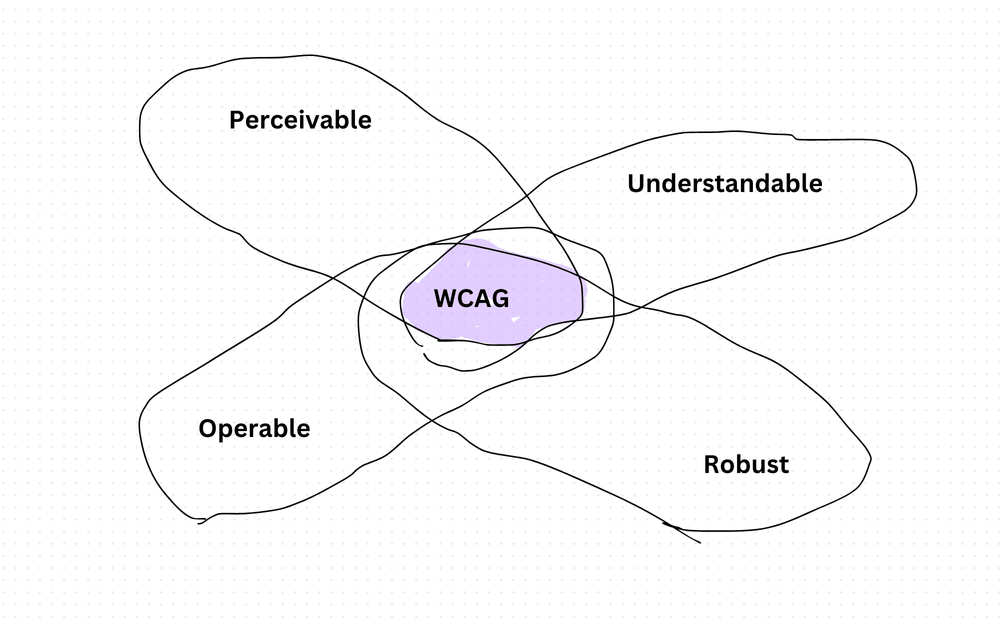
The four principles: POUR
Everything in WCAG traces back to four principles.
Perceivable — Users must be able to perceive the content. If an image has no alt text, a blind user can't perceive it. If a video has no captions, a deaf user can't perceive it. Every piece of non-text content needs a text alternative.
Operable — Users must be able to interact with the interface. That means full keyboard support, no time traps, no content that causes seizures, and clear navigation. If a feature only works with a mouse, it fails this principle.
Understandable — Content and UI behavior must be predictable. Readable text, consistent navigation, helpful error messages. If a user can't figure out what a form field expects or where a link goes, you've failed here.
Robust — Content must work across browsers, devices, and assistive technologies — now and in the future. Valid markup, standard patterns, and progressive enhancement are the tools for this.
Conformance levels
WCAG defines three levels:
- Level A — the bare minimum. Fixes the worst barriers. If you don't meet this, your site is actively hostile to assistive technology users.
- Level AA — the standard target. Most legal requirements and corporate policies aim here. Covers contrast ratios, resize support, and keyboard focus visibility.
- Level AAA — the gold standard. Aspirational for most sites. Requires things like sign language interpretation for video and enhanced contrast ratios.
Most teams should aim for AA. It's achievable and covers the most impactful guidelines.
Practical implementation
- Add
altattributes to every image. Decorative images getalt="". - Maintain a contrast ratio of at least 4.5:1 for normal text, 3:1 for large text.
- Make every interactive element reachable and operable via keyboard.
- Ensure focus indicators are visible — never remove the outline without a replacement.
- Write clear labels and instructions. Don't rely on color alone to convey meaning.
- Test across screen readers (VoiceOver, NVDA, JAWS) and keyboard-only navigation.
Tools I use to measure compliance
- axe (browser extension by Deque) — fast, accurate, integrates into CI pipelines. My go-to for automated checks.
- Lighthouse (built into Chrome DevTools) — good for quick audits. Runs WCAG checks alongside performance and SEO.
- WAVE (by WebAIM) — visual overlay that highlights issues directly on the page. Great for spotting structural problems.
- Pa11y — open-source CLI tool that plugs into CI/CD. I use this for automated regression testing on every deploy.
- Accessibility Insights (by Microsoft) — combines automated scans with guided manual testing flows. The manual assessment is especially valuable.
The trade-off
WCAG compliance takes time. It adds considerations to every design decision and every component build. Color choices, font sizes, interaction patterns, error handling — all of it gets an extra review step.
The payoff: you reach more users, reduce legal risk, and build better interfaces. Accessibility constraints force clarity. Clarity makes better products.
Don't treat WCAG as a checklist to satisfy once. Bake it into your design system, your component library, and your CI pipeline. Retroactive fixes are expensive. Building accessible from the start is cheap.
Production-Ready Systems with LLMs and Agents
A live Maven cohort, 5 October to 2 November: eight 90-minute sessions where you build LLM and agent systems that survive real traffic, real cost and real failure. Tuesdays and Thursdays, 7:30 to 9:00pm London.
Cohort 2 starts 5 October. Eight live sessions, $1,500.
View the live cohort