Composite Design Pattern
I needed to calculate the total size of a directory. The directory contains files and subdirectories. Subdirectories contain more files and subdirectories...
23 Mar 2024
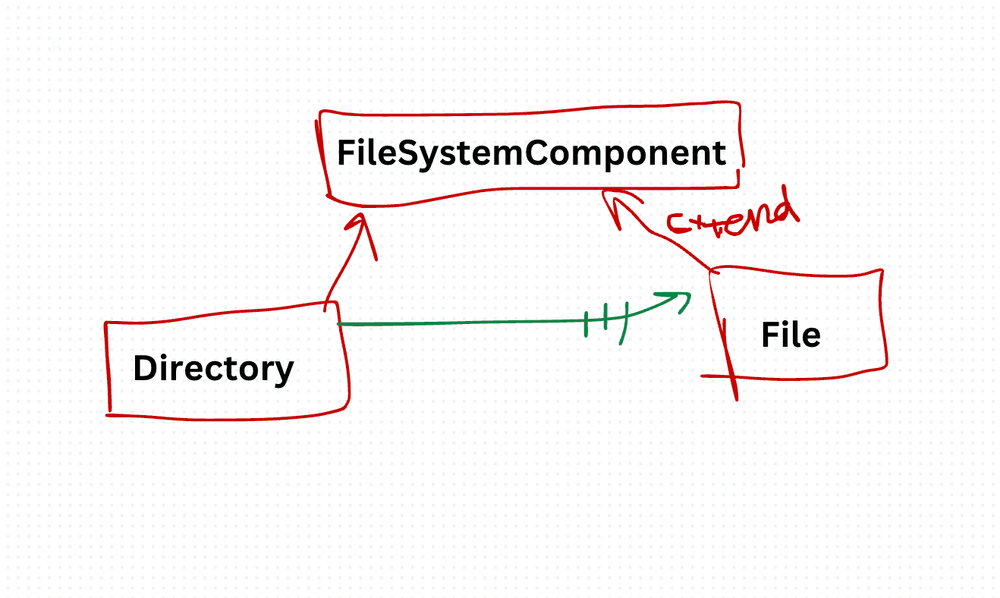
I needed to calculate the total size of a directory. The directory contains files and subdirectories. Subdirectories contain more files and subdirectories. I started writing recursive logic with type checks everywhere — if it's a file, get size; if it's a directory, loop and recurse. It was ugly and fragile.
The Composite pattern eliminates that branching. It lets you treat individual objects and groups of objects through the same interface. Call display() on a file? It displays the file. Call display() on a directory? It displays itself and tells its children to display themselves.
Think of it like an org chart. You ask a team lead "what's your team working on?" They answer for themselves and then ask each team member the same question. You don't need to know who's a lead and who's an individual contributor.
Three components make it work:
- Component — The shared interface. Every node implements it.
- Leaf — An individual object with no children. (A file.)
- Composite — A container that holds children, which can be leaves or other composites. (A directory.)
class FileSystemComponent {
  constructor(name) {
    this.name = name;
  }

  display() {
    throw new Error("display method must be implemented.");
  }
}

class File extends FileSystemComponent {
  display() {
    console.log(`File: ${this.name}`);
  }
}

class Directory extends FileSystemComponent {
  constructor(name) {
    super(name);
    this.children = [];
  }

  add(component) {
    this.children.push(component);
  }

  remove(component) {
    const index = this.children.indexOf(component);
    if (index !== -1) {
      this.children.splice(index, 1);
    }
  }

  display() {
    console.log(`Directory: ${this.name}`);
    this.children.forEach(child => child.display());
  }
}

const root = new Directory("Root");
const folder1 = new Directory("Folder 1");
const folder2 = new Directory("Folder 2");
const file1 = new File("File 1");
const file2 = new File("File 2");

root.add(folder1);
root.add(folder2);
folder1.add(file1);
folder2.add(file2);

root.display();
// Directory: Root
// Directory: Folder 1
// File: File 1
// Directory: Folder 2
// File: File 2
Client code calls root.display(). It doesn't check types. It doesn't recurse manually. The composite handles the recursion internally.
The benefit: Uniform treatment of individual and composite objects. Adding new leaf or composite types is easy — just implement the interface. Client code stays simple regardless of tree depth.
The cost: The shared interface can feel forced. Not every operation makes sense on both leaves and composites (add() on a file?). You end up either throwing errors for invalid operations or leaving them as no-ops, both of which are code smells. Also, if your structure isn't naturally tree-shaped, don't force it into one.
I use Composite for UI component trees, menu systems, file systems, and organizational hierarchies. Anywhere you have a part-whole relationship with recursive structure, this pattern fits.
Production-Ready Systems with LLMs and Agents
A live Maven cohort, 5 October to 2 November: eight 90-minute sessions where you build LLM and agent systems that survive real traffic, real cost and real failure. Tuesdays and Thursdays, 7:30 to 9:00pm London.
Cohort 2 starts 5 October. Eight live sessions, $1,500.
View the live cohortKeep reading
- Event Sourcing Checklist: When It Makes Sense & Common Pitfalls
- Error Boundary React Design Pattern
- Context API React Design Pattern
- Higher-Order Component (HOC) React Design Pattern
- Container Component React Design Pattern
- Best Practices for Structuring Express.js Applications with Prisma Design Pattern