Observer Design Pattern
I built a dashboard where a stock price update needed to refresh a chart, a notification badge, and a data table — simultaneously. My first approach was t...
23 Mar 2024
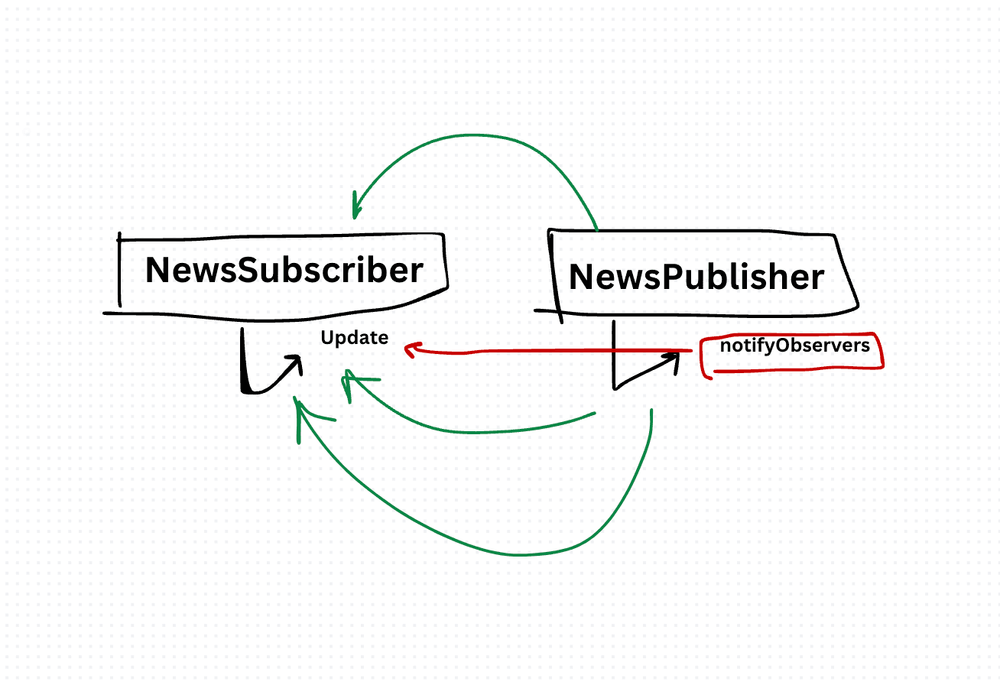
I built a dashboard where a stock price update needed to refresh a chart, a notification badge, and a data table — simultaneously. My first approach was to have the price service directly call each component's update method. Adding a fourth component meant modifying the price service. Tight coupling everywhere.
The Observer pattern fixes this. One object (the Subject) maintains a list of dependents (Observers). When the Subject's state changes, it notifies all Observers automatically. The Subject doesn't know what the Observers do with the information — it just broadcasts.
Think of it like a newsletter. You subscribe. When there's new content, you get an email. The newsletter doesn't care if you read it, share it, or delete it. You can unsubscribe anytime.
class NewsPublisher {
  constructor() {
    this.observers = [];
  }

  addObserver(observer) {
    this.observers.push(observer);
  }

  removeObserver(observer) {
    this.observers = this.observers.filter(obs => obs !== observer);
  }

  notifyObservers(news) {
    this.observers.forEach(observer => observer.update(news));
  }
}class NewsSubscriber {
constructor(name) {
this.name = name;
}
update(news) {
console.log(`${this.name} received: ${news}`);
}
}const publisher = new NewsPublisher();
const sub1 = new NewsSubscriber("Dashboard");
const sub2 = new NewsSubscriber("Notification Bar");
publisher.addObserver(sub1);
publisher.addObserver(sub2);
publisher.notifyObservers("Breaking: JavaScript wins Language of the Year!");
// Dashboard received: Breaking: JavaScript wins Language of the Year!
// Notification Bar received: Breaking: JavaScript wins Language of the Year!
publisher.removeObserver(sub1);
publisher.notifyObservers("Update: ES2024 features announced!");
// Notification Bar received: Update: ES2024 features announced!NewsPublisher is the Subject. It doesn't know anything about dashboards or notification bars. It just maintains a list and calls update() on everyone in it.
Adding a third subscriber — say, a logging service — requires zero changes to NewsPublisher. Just call addObserver().
Where You've Already Seen This
- DOM event listeners (
addEventListener) - React's state and re-rendering
- Node.js
EventEmitter - Redux store subscriptions
- RxJS Observables
You're using the Observer pattern constantly, even if you don't call it that.
The benefit: Loose coupling. The subject and observers evolve independently. Adding new observers doesn't touch existing code. It's the foundation of reactive programming.
The cost: Debugging notification chains is hard. When something updates unexpectedly, you have to trace which observer was called and why. Memory leaks happen when observers aren't properly unsubscribed — especially common in SPAs with component lifecycle issues. And for complex event flows, cascading observers (observer A triggers observer B triggers observer C) can create hard-to-follow chains.
I use Observer for event systems, reactive state management, and any case where one change needs to trigger multiple independent reactions. If you only have one listener, a simple callback is enough.
Production-Ready Systems with LLMs and Agents
A live Maven cohort, 5 October to 2 November: eight 90-minute sessions where you build LLM and agent systems that survive real traffic, real cost and real failure. Tuesdays and Thursdays, 7:30 to 9:00pm London.
Cohort 2 starts 5 October. Eight live sessions, $1,500.
View the live cohortKeep reading
- Event Sourcing Checklist: When It Makes Sense & Common Pitfalls
- Error Boundary React Design Pattern
- Context API React Design Pattern
- Higher-Order Component (HOC) React Design Pattern
- Container Component React Design Pattern
- Best Practices for Structuring Express.js Applications with Prisma Design Pattern