TLS and HTTPS: Understanding How They Work
Every time you see the padlock icon in your browser, TLS is doing the heavy lifting. It encrypts the data flowing between your browser and the server so n...
7 May 2024
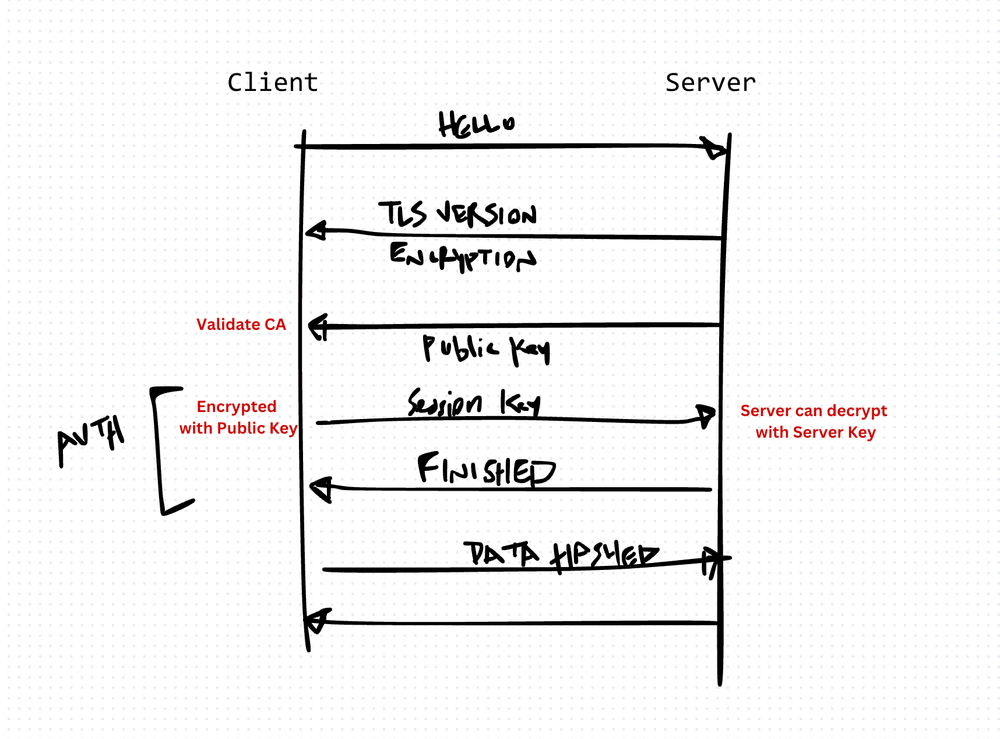
Every time you see the padlock icon in your browser, TLS is doing the heavy lifting. It encrypts the data flowing between your browser and the server so no one in between — your ISP, a coffee shop's Wi-Fi, a man-in-the-middle attacker — can read or tamper with it.
HTTPS is just HTTP wrapped in TLS. Same protocol, same requests and responses, but encrypted.
How the TLS handshake works
Before any data moves, the client and server perform a handshake. Here's what happens:
- Client Hello — Your browser sends a list of supported cipher suites and a random number to the server.
- Server Hello — The server picks a cipher suite, sends its digital certificate (issued by a trusted Certificate Authority), and its own random number.
- Certificate verification — Your browser checks the certificate chain against its list of trusted CAs. If the certificate is invalid, expired, or issued by an untrusted authority, the connection is rejected.
- Key exchange — Both sides derive a shared session key using asymmetric cryptography. This session key is used for symmetric encryption going forward — faster than asymmetric for bulk data.
- Secure connection established — All subsequent HTTP traffic is encrypted with the session key.
This entire handshake takes milliseconds. TLS 1.3 reduced it to a single round trip.
What TLS protects
- Confidentiality — Data is encrypted end-to-end. An attacker sniffing the network sees ciphertext, not passwords or credit card numbers.
- Integrity — Each message includes a MAC (message authentication code). If a single byte is altered in transit, the recipient detects it and drops the message.
- Authentication — The certificate proves the server is who it claims to be. Without this, a DNS hijacker could impersonate your bank and you'd never know.
What TLS does not protect
TLS encrypts the transport layer. It doesn't protect against:
- Compromised endpoints — If the server itself is hacked, TLS doesn't help. The data is decrypted at the server.
- Application-layer attacks — SQL injection, XSS, and CSRF happen after TLS decrypts the request. TLS doesn't inspect or validate application logic.
- Metadata leakage — TLS hides the content but not the fact that communication is happening. An observer can still see which IP addresses you connect to, when, and how much data flows.
- Bad certificates — TLS relies on Certificate Authorities. If a CA is compromised or issues a fraudulent certificate, the trust model breaks.
The trade-off
TLS adds latency — the handshake takes time, and encryption/decryption consume CPU cycles. In practice, modern hardware makes this negligible. TLS 1.3 minimizes the round trips, and session resumption eliminates the handshake for repeat connections.
The real cost is operational. You need to manage certificates — provisioning, renewal, revocation. Let's Encrypt made this dramatically easier with free, automated certificates. But certificate mismanagement (expired certs, misconfigured chains) remains one of the most common causes of production outages.
There's no good reason to serve anything over plain HTTP in 2024. TLS is the baseline. The question isn't whether to use it — it's whether you're using it correctly.
Production-Ready Systems with LLMs and Agents
A live Maven cohort, 5 October to 2 November: eight 90-minute sessions where you build LLM and agent systems that survive real traffic, real cost and real failure. Tuesdays and Thursdays, 7:30 to 9:00pm London.
Cohort 2 starts 5 October. Eight live sessions, $1,500.
View the live cohort