Exploring Promise APIs in TypeScript
Promises represent async work that will either succeed or fail. TypeScript makes them better by letting you type the resolved value. Here's a practical to...
10 May 2024
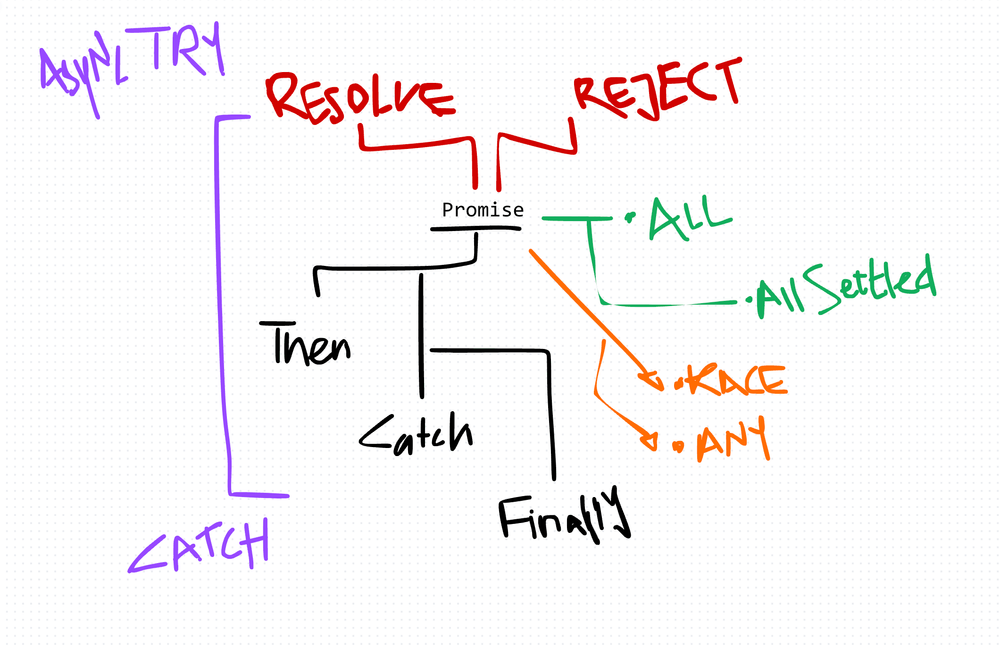
Promises represent async work that will either succeed or fail. TypeScript makes them better by letting you type the resolved value. Here's a practical tour of every Promise API you need to know.
Basic Promise with types
const fetchData = (): Promise<string> => {
  return new Promise((resolve, reject) => {
    setTimeout(() => {
      resolve('Data fetched successfully');
    }, 2000);
  });
};

const fetchDataAsync = async () => {
  const data: string = await fetchData();
  console.log(data);
};
The Promise<string> annotation tells TypeScript (and everyone reading the code) exactly what this function resolves to.
Chaining with .then()
fetchData()
  .then((data: string) => {
    console.log(data);
    return processData(data);
  })
  .then((result: number) => {
    console.log(`Processed result: ${result}`);
  })
  .catch((error: Error) => {
    console.error('An error occurred:', error.message);
  });
TypeScript infers the type through each .then() step. If the types don't match, the compiler catches it.
Error handling
fetchData()
  .then((data: string) => {
    console.log(data);
    return processData(data);
  })
  .catch((error: Error) => {
    console.error('Error fetching or processing data:', error.message);
    throw error;
  });
Always catch. Unhandled promise rejections crash Node.js processes and silently fail in browsers.
async/await — the cleaner syntax
const fetchDataAsync = async (): Promise<void> => {
  try {
    const data: string = await fetchData();
    console.log(data);
  } catch (error) {
    console.error('An error occurred:', error.message);
  }
};
Same behavior as .then() chains, but reads top-to-bottom. I use this by default unless I'm composing multiple streams.
Promise.all() — run in parallel, fail fast
Runs multiple promises concurrently. Resolves when all succeed. Rejects the moment any one fails.
const promises: Promise<number>[] = [
  asyncOperation1(),
  asyncOperation2(),
  asyncOperation3(),
];

try {
  const results: number[] = await Promise.all(promises);
  console.log('All promises resolved:', results);
} catch (error) {
  console.error('Error occurred:', error);
}
Use it when all results are needed and any failure means the whole operation is invalid.
Promise.race() — first one wins
Resolves (or rejects) with whichever promise settles first.
const promises: Promise<number>[] = [
  asyncOperation1(),
  asyncOperation2(),
  asyncOperation3(),
];

try {
  const result: number = await Promise.race(promises);
  console.log('First promise resolved:', result);
} catch (error) {
  console.error('Error occurred:', error);
}
Good for timeouts. Race your actual operation against a timer promise.
Promise.allSettled() — wait for everything, no matter what
Waits for every promise to finish, whether it resolved or rejected. Returns an array describing each outcome.
const promises = [
  Promise.resolve('Resolved promise'),
  Promise.reject(new Error('Rejected promise')),
  Promise.resolve('Another resolved promise')
];

Promise.allSettled(promises)
  .then((results) => {
    results.forEach((result) => {
      if (result.status === 'fulfilled') {
        console.log('Fulfilled:', result.value);
      } else {
        console.log('Rejected:', result.reason.message);
      }
    });
  });
Use this when partial success is acceptable. Batch operations where some items might fail but you don't want to abort the rest.
Promise.any() — first success wins
Like Promise.race(), but ignores rejections. Only rejects if every promise rejects.
const promises = [
  new Promise((resolve, reject) => setTimeout(() => resolve('First'), 1000)),
  new Promise((resolve, reject) => setTimeout(() => reject(new Error('Failed')), 500)),
  new Promise((resolve, reject) => setTimeout(() => resolve('Third'), 1500))
];

Promise.any(promises)
  .then((result) => {
    console.log('First fulfilled promise:', result);
  })
  .catch((error) => {
    console.error('All promises were rejected:', error);
  });
Useful for redundancy — try multiple providers, take whichever responds first successfully.
.finally() — cleanup regardless of outcome
promise
  .then((result) => {
    console.log('Promise fulfilled with result:', result);
  })
  .catch((error) => {
    console.error('Promise rejected with error:', error);
  })
  .finally(() => {
    console.log('Cleanup: closing connection, hiding spinner, etc.');
  });
Runs whether the promise resolved or rejected. Perfect for cleanup — closing connections, hiding loading spinners, releasing locks.
Picking the right API
| API | Use when |
|---|---|
Promise.all | All must succeed |
Promise.allSettled | Partial failure is OK |
Promise.race | First result matters (including failures) |
Promise.any | First success matters |
Production-Ready Systems with LLMs and Agents
A live Maven cohort, 5 October to 2 November: eight 90-minute sessions where you build LLM and agent systems that survive real traffic, real cost and real failure. Tuesdays and Thursdays, 7:30 to 9:00pm London.
Cohort 2 starts 5 October. Eight live sessions, $1,500.
View the live cohortKeep reading
- TypeScript Anti-Patterns That Cost You Twice: Build Time, Runtime, and the Interview
- The Frontend Toolchain Is Now Written in Rust and Go. What That Means for You
- oxlint vs ESLint: Why I Replaced ESLint with oxlint
- SystemJS Is Dead. Native ESM Finally Won.
- Replace Axios with a Simple Custom Fetch Wrapper (Production-Ready Guide)
- Stop Shipping ChatGPT Wrappers. Ship an Agent in TypeScript, or Don't Bother.