How would you design Dropbox?
Dropbox does one thing and does it well: keep your files in sync across every device you own. Simple idea. Monstrous engineering challenge underneath.
31 Mar 2024
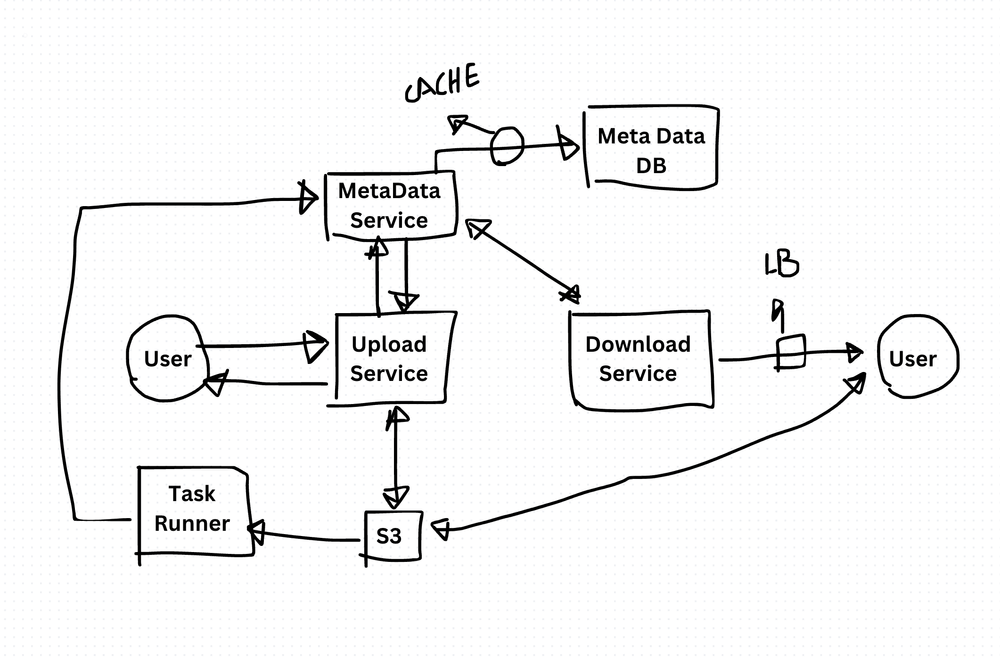
Dropbox does one thing and does it well: keep your files in sync across every device you own. Simple idea. Monstrous engineering challenge underneath.
I've worked on file sync problems before. The moment you think "just upload the file," you realize how many edge cases exist. Conflicts. Partial uploads. Offline edits. Files changing mid-sync. The interesting part of designing Dropbox isn't the feature list — it's how you handle all the things that go wrong.
What the System Needs to Do
Non-Technical Requirements
- Scalability — millions of users uploading, downloading, and syncing files simultaneously. The system must grow horizontally.
- Reliability — if someone uploads a file, it must never disappear. Data loss is unacceptable. Full stop.
- Data Privacy and Security — files are encrypted at rest and in transit. Access controls are granular. Users trust you with their data.
- Cross-Platform Support — desktop, mobile, web, tablet. The sync experience must feel identical everywhere.
- Collaboration — shared folders, real-time co-editing, version history, commenting. Files aren't just stored — they're worked on together.
Technical Requirements
- Efficient Storage and Sync — store files across distributed servers. Detect changes quickly. Sync only what changed, not the entire file.
- Fast File Transfer — upload and download need to be fast, even for large files. Resumable uploads are essential.
- Version Control and Conflict Resolution — track every version of every file. When two people edit the same file offline, resolve the conflict gracefully.
- Access Control — fine-grained permissions at the file and folder level. Read-only vs. edit vs. owner.
- Offline Access — users must be able to work without internet. Changes sync when connectivity returns.
Low-Level Design
Storage Layer. Use distributed object storage like S3 or GCS. Files are chunked into blocks. Each block is stored independently. This enables deduplication — if two users upload the same file, you store the blocks once.
Sync Engine. This is the heart of Dropbox. It uses delta sync — only changed blocks are uploaded, not the entire file. The client computes a SHA-256 hash for each block. If the hash matches what's on the server, that block is skipped. This dramatically reduces bandwidth.
Encryption. AES-256 for data at rest. TLS for data in transit. Keys are managed separately from the data itself.
Access Control Lists. RBAC (role-based access control) at the file and folder level. Permissions propagate down the folder tree.
Conflict Resolution. When two users edit the same file offline, Dropbox creates a "conflicted copy" with the user's name and timestamp. No silent data loss. The trade-off is that users must manually reconcile, but that's better than losing changes.
High-Level Design
- Client Applications — desktop and mobile apps handle local file watching, chunking, hashing, and sync coordination.
- Backend Services — microservices for file storage, sync orchestration, authentication, metadata management, and notification delivery.
- API Gateway — handles auth, rate limiting, and request routing to backend services.
- Web Interface — browser-based access for file browsing, sharing, and account management.
- Infrastructure — cloud-based (AWS/Azure/GCP) with auto-scaling, load balancing, and multi-region replication.
The Trade-Offs
Chunking and delta sync make uploads fast and bandwidth-efficient. But they add complexity to the client. Every client must implement chunking, hashing, and reassembly logic correctly.
Deduplication saves storage costs. But it means you need content-addressable storage and careful handling of encryption (you can't deduplicate encrypted blocks unless you use convergent encryption, which has its own security trade-offs).
Offline-first design gives great UX. But conflict resolution is hard. "Last write wins" loses data. "Conflicted copies" confuse users. There's no perfect answer — just trade-offs between data safety and simplicity.
Dropbox got the balance right for most use cases. The system favors data safety over convenience, which is the correct priority when you're storing people's files.
Production-Ready Systems with LLMs and Agents
A live Maven cohort, 5 October to 2 November: eight 90-minute sessions where you build LLM and agent systems that survive real traffic, real cost and real failure. Tuesdays and Thursdays, 7:30 to 9:00pm London.
Cohort 2 starts 5 October. Eight live sessions, $1,500.
View the live cohort